2Expertise and authority can work in parallel under one accountable case owner.
3Ownership transfers only after acceptance; acknowledgment is not resolution.
4Preserve original commitments and deadlines through every reassignment.
5Use illustrative tiers and targets as examples, not universal policies or legal deadlines.
A customer calls three times about the same billing error. Each agent apologizes, but nobody can authorize the correction. The ticket keeps moving and the customer receives no meaningful update. This is not only a slow resolution problem; it is a missing escalation route.
An escalation path in customer support defines when a case must move beyond its current handler, who accepts the next responsibility, what information travels with it, and how progress is communicated. The path should make decisions predictable without forcing urgent cases through unnecessary layers.
This guide shows how to design escalation triggers, assign accountable owners, handle sensitive exceptions, and evaluate results.
An escalation path in customer support is a documented sequence of decision rules, responsibilities, and handoff steps used when the original support owner cannot resolve a case within their expertise, authority, risk tolerance, or agreed time. It defines the next responsible person and the conditions for moving the case further.
An escalation is an event: a particular ticket requires another team or decision-maker. The escalation path is the operating design that determines how that event should happen.
Every effective path answers four questions: What triggers the handoff? Who takes responsibility? What evidence and context must accompany the case? When must the receiving owner acknowledge and act? Without these answers, moving the ticket can create activity without accountability.
Acknowledgment confirms receipt, not final resolution. A task referral does not automatically transfer the whole case.
Why Do Customer Support Teams Need an Escalation Path?
Support agents cannot reasonably hold every technical skill, financial approval, policy exception, or regulatory judgment. An escalation path lets them transfer work to someone qualified while preserving the customer relationship and case history.
Well-designed routes reduce repeated explanations, missed callbacks, and unresolved ownership disputes. They also make it easier to spot approaching service-level targets, raise material risks, and decide whether management intervention is necessary.
An informal approach often relies on personal relationships: one experienced agent knows whom to message, while a new colleague does not. A documented escalation path in customer support gives both people the same route and makes service performance measurable. In regulated settings, recorded handoffs can also help teams demonstrate that decisions were reviewed, subject to the rules that apply to their organization. ISO 10002:2018 offers guidance for internal complaints handling, not a universal escalation ladder. 1
How Does a Customer Support Escalation Path Work?
Step 1: Identify the escalation trigger
Look for repeated failed attempts, an expiring response target, a technical dependency, exceeded authority, or a safety, privacy, or regulatory concern. Record the triggering fact rather than merely labeling the customer as difficult.
Step 2: Assess impact, urgency, and risk
Determine who is affected, the consequences of delay, and whether the case involves a vulnerable customer or sensitive data. A frustrated tone can support triage, but sentiment alone does not establish severity.
Step 3: Choose the correct route
Send a specialist issue to the team with expertise. Send an exception requiring approval to someone with decision authority. A case can need both paths in parallel, with one accountable case owner coordinating them.
Step 4: Confirm acceptance
A reassignment is not a completed handoff until the receiving person or queue acknowledges it under the defined operating procedure. Record current ownership, backup owner, and any due time.
Ownership transfers only when the receiving owner accepts responsibility. Until then, the current owner remains accountable and follows the backup route if acceptance is overdue.
Step 5: Update the customer
Explain what happens next, who is coordinating the case, and when another update can be expected. Do not promise a result or deadline the receiving team has not confirmed.
Step 6: Resolve and learn
Record the decision, supporting evidence, customer communication, and closure reason. Review recurring escalations for training, product improvement, or root-cause investigation instead of treating every event as an isolated complaint.
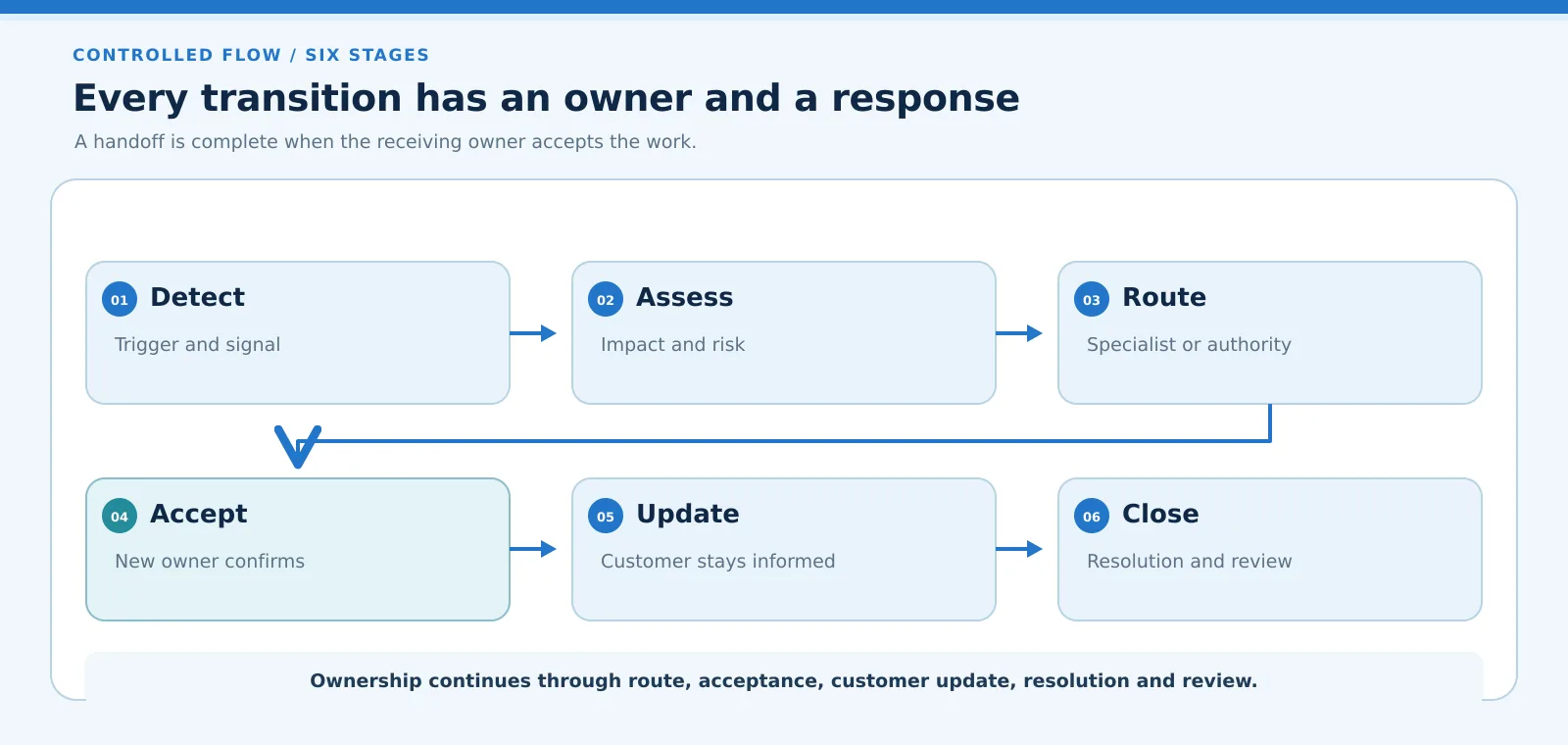
Six stages in unambiguous order: Detect, Assess, Route, Accept, Update, Close. The sequence moves across the first row, turns down to Accept, then continues left to right through Update and Close. Close means resolution and review.
CONTROLLED FLOW / SIX STAGES
Every transition has an owner and a response
A handoff is complete when the receiving owner accepts the work.
01
Detect
Trigger and signal
02
Assess
Impact and risk
03
Route
Specialist or authority
04
Accept
New owner confirms
05
Update
Customer stays informed
06
Close
Resolution and review
Ownership continues through route, acceptance, customer update, resolution and review.
Escalation path: six controlled stages
Six stages in unambiguous order: Detect, Assess, Route, Accept, Update, Close. The sequence moves across the first row, turns down to Accept, then continues left to right through Update and Close. Close means resolution and review.
CONTROLLED FLOW / SIX STAGES
Every transition has an owner and a response
A handoff is complete when the receiving owner accepts the work.
01
Detect
Trigger and signal
02
Assess
Impact and risk
03
Route
Specialist or authority
04
Accept
New owner confirms
05
Update
Customer stays informed
06
Close
Resolution and review
Ownership continues through route, acceptance, customer update, resolution and review.
Figure 1. Six controlled stages, with an explicit turn from Route to Accept.
What Are the Different Customer Support Escalation Levels?
Support tiers describe increasing expertise or decision authority, but the number of levels varies across organizations. An escalation path in customer support should support direct routing when an urgent concern requires a specialist or risk owner, rather than always forcing a ticket through every tier.
Level
Typical responsibility
Common trigger
L1: Frontline
Initial diagnosis and customer updates
Issue cannot be resolved with standard guidance
L2: Specialists
Complex product or account investigation
Advanced expertise or additional access is required
L3: Management
Resource allocation and policy exceptions
Decision exceeds frontline or specialist authority
L4: Risk / leadership
Material harm, external dependency or governance
Serious privacy, safety, legal or enterprise consequence
These levels describe a convenient example, not an industry-wide standard. A bank may maintain separate complaints and risk functions; a technical SaaS provider may have engineering on-call escalation independent of customer-service management.
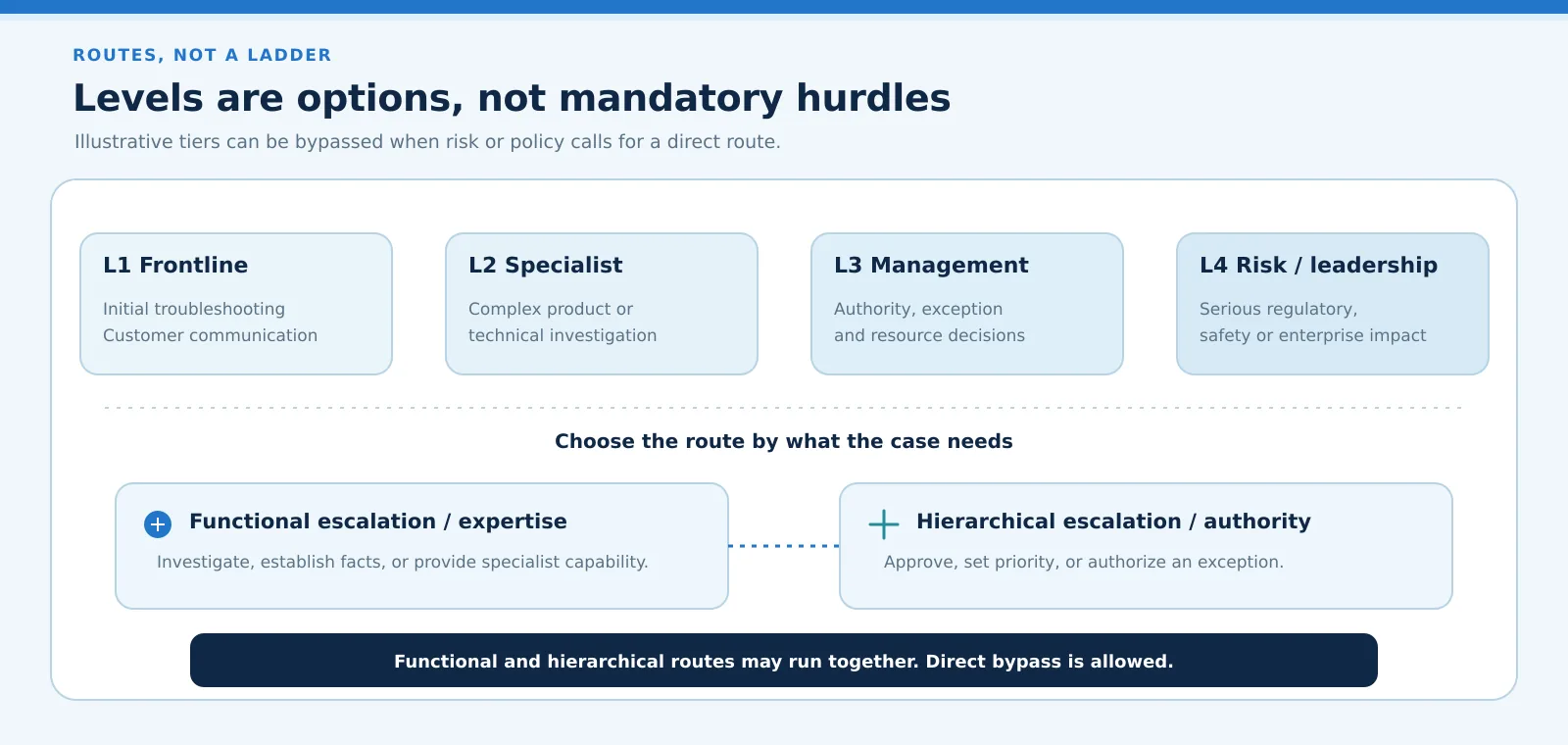
Illustrative level options: L1 Frontline handles initial troubleshooting and customer communication; L2 Specialist investigates complex product or technical issues; L3 Management handles authority, exceptions and resources; L4 Risk or leadership addresses serious regulatory, safety or enterprise impact. Tiers are not mandatory. Functional escalation routes to expertise, hierarchical escalation routes to authority, and direct bypass is allowed.
ROUTES, NOT A LADDER
Levels are options, not mandatory hurdles
Illustrative tiers can be bypassed when risk or policy calls for a direct route.
L1 Frontline
Initial troubleshooting
Customer communication
L2 Specialist
Complex product or
technical investigation
L3 Management
Authority, exception
and resource decisions
L4 Risk / leadership
Serious regulatory,
safety or enterprise impact
Choose the route by what the case needs
Functional escalation / expertise
Investigate, establish facts, or provide specialist capability.
Hierarchical escalation / authority
Approve, set priority, or authorize an exception.
Functional and hierarchical routes may run together. Direct bypass is allowed.
Escalation levels are routes, not mandatory hurdles
Illustrative level options: L1 Frontline handles initial troubleshooting and customer communication; L2 Specialist investigates complex product or technical issues; L3 Management handles authority, exceptions and resources; L4 Risk or leadership addresses serious regulatory, safety or enterprise impact. Tiers are not mandatory. Functional escalation routes to expertise, hierarchical escalation routes to authority, and direct bypass is allowed.
ROUTES, NOT A LADDER
Levels are options, not mandatory hurdles
Illustrative tiers can be bypassed when risk or policy calls for a direct route.
L1 Frontline
Initial troubleshooting
Customer communication
L2 Specialist
Complex product or
technical investigation
L3 Management
Authority, exception
and resource decisions
L4 Risk / leadership
Serious regulatory,
safety or enterprise impact
Choose the route by what the case needs
Functional escalation / expertise
Investigate, establish facts, or provide specialist capability.
Hierarchical escalation / authority
Approve, set priority, or authorize an exception.
Functional and hierarchical routes may run together. Direct bypass is allowed.
Figure 2. Use illustrative tiers as routes, not mandatory hurdles.
Functional vs Hierarchical Escalation: What Is the Difference?
Functional escalation sends a case to someone with a different skill set. A customer cannot reproduce an error after standard troubleshooting, so frontline support involves a platform engineer. The reason for the handoff is expertise, not seniority.
Hierarchical escalation moves a decision to someone with additional authority. For instance, a refund outside the published approval limit may require a supervisor, even if the original agent understands the complaint perfectly.
One case can involve both: engineering investigates a defect while a manager decides whether an exception is appropriate. A good customer support escalation path makes the overall case owner explicit and avoids creating two competing customer responses.
This guide covers the overall customer support path, rather than only comparing functional and hierarchical escalation.
When Should a Customer Support Issue Be Escalated?
Set triggers that are observable and actionable. A useful escalation policy does not assume that every negative interaction requires management intervention or that a customer must repeatedly complain before receiving specialist help.
Trigger
Why it matters
Suggested response
SLA at risk
Commitment may be missed
Reassess priority, owner and communication
Repeated unresolved contact
Previous actions have not worked
Review history and route to accountable case lead
Complex technical dependency
Frontline tools are insufficient
Engage specialist with diagnostic evidence
Privacy or safety concern
Delay or wrong access may cause harm
Use approved priority risk pathway
Approval authority exceeded
Current owner cannot authorize outcome
Route to authorized decision-maker
Potential regulatory complaint
Formal obligations may apply
Involve compliance or designated complaints owner
For a regulated organization, the correct escalation threshold depends on the jurisdiction, the kind of complaint, and relevant internal policy. For example, FCA DISP contains specific handling and communication obligations for complaints within its scope. Do not treat one sector's response timetable as a universal rule for all support tickets.
Check the current application provisions in DISP 1.1 and applicable handling and time-limit provisions before adopting a rule. Internal targets do not replace external obligations. 2
Customer Support Escalation Path Examples
Examples are most useful when they explain both the decision and the information that must move with it. The following scenarios illustrate escalation path in customer support decisions, not prescribed operating rules for every organization.
Scenario
Route
Essential handoff context
Billing dispute above refund limit
Billing authority / manager
Invoice, prior adjustments, customer request
Product defect with repeat failures
Technical specialist
Steps to reproduce, logs, impact
Possible personal-data exposure
Privacy/risk owner
What was exposed, who accessed it, time
Three contacts without resolution
Case lead
Prior attempts, promises, current owner
Consider the billing example. The frontline agent can collect the invoice and verify the account, but cannot approve the proposed adjustment. The agent retains communication responsibility until the designated case owner explicitly accepts the case, while the authorized approver decides the remedy. The customer should not need to explain the entire history again.
In the product-defect example, escalation to engineering does not automatically mean the engineer becomes the customer-facing owner. The support case lead may coordinate updates while engineering resolves the defect. This distinction is especially important when multiple teams must contribute before a case can close.
How to Create a Customer Support Escalation Matrix
A practical matrix for an escalation path in customer support turns policy into a usable routing decision. It should be short enough to consult during a live interaction and specific enough to prevent uncertainty. Treat every response target in the example below as illustrative; adopt actual targets only after operational and contractual review.
Define categories and observable triggers
Group cases by skill requirement, authority, impact, and sensitivity. Avoid labels such as “angry customer” unless the trigger also explains what operational action is required.
Assign a primary and backup owner
Specify who accepts the case, who covers absence, and who maintains customer communication. Use named roles or maintained on-call groups rather than a single individual who may be unavailable.
Set acknowledgment and update expectations
Separate the time to acknowledge an escalation from time to resolve the underlying issue. Define how overdue escalations are re-routed without silently resetting the original customer commitment.
Require minimum handoff evidence
Specify essential fields such as reason for escalation, timeline, prior attempts, affected service, requested decision, and supporting documentation. Require only information necessary for the receiving team to act; access to sensitive evidence must remain permission-controlled.
Test and review the matrix
Run tabletop examples for absence, competing priorities, unresolved handoffs, and sensitive cases. Update the matrix when products, organizational roles, or approval limits change.
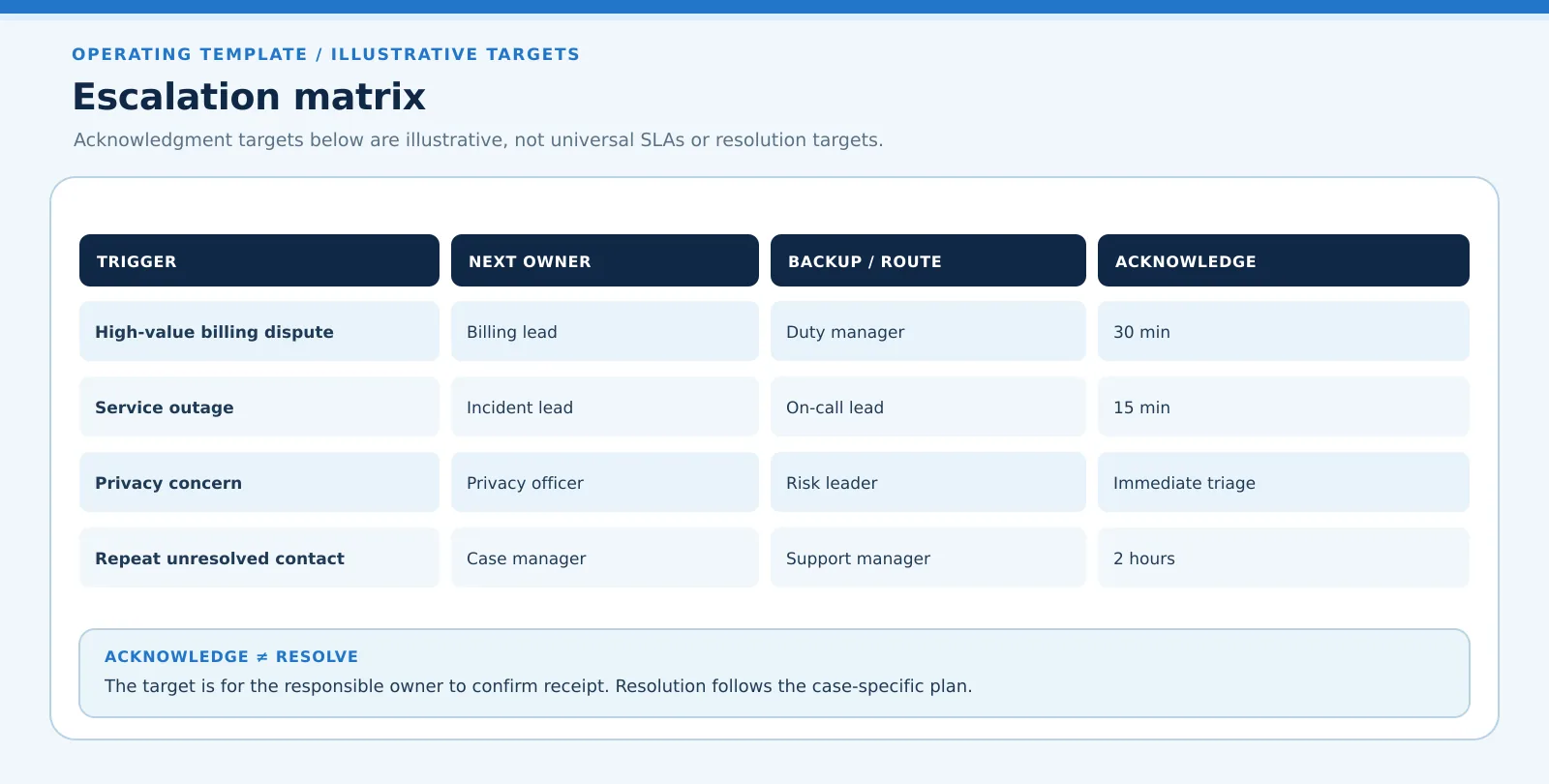
Illustrative escalation targets: High-value billing dispute to Billing lead, Duty manager backup, acknowledge in 30 min; Service outage to Incident lead, On-call lead backup, acknowledge in 15 min; Privacy concern to Privacy officer, Risk leader backup, immediate triage; Repeat unresolved contact to Case manager, Support manager backup, acknowledge in 2 hours. These are acknowledgment targets, not resolution targets or universal SLAs.
OPERATING TEMPLATE / ILLUSTRATIVE TARGETS
Escalation matrix
Acknowledgment targets below are illustrative, not universal SLAs or resolution targets.
TRIGGER
NEXT OWNER
BACKUP / ROUTE
ACKNOWLEDGE
High-value billing dispute
Billing lead
Duty manager
30 min
Service outage
Incident lead
On-call lead
15 min
Privacy concern
Privacy officer
Risk leader
Immediate triage
Repeat unresolved contact
Case manager
Support manager
2 hours
ACKNOWLEDGE ≠ RESOLVE
The target is for the responsible owner to confirm receipt. Resolution follows the case-specific plan.
Escalation matrix: a practical operating template
Illustrative escalation targets: High-value billing dispute to Billing lead, Duty manager backup, acknowledge in 30 min; Service outage to Incident lead, On-call lead backup, acknowledge in 15 min; Privacy concern to Privacy officer, Risk leader backup, immediate triage; Repeat unresolved contact to Case manager, Support manager backup, acknowledge in 2 hours. These are acknowledgment targets, not resolution targets or universal SLAs.
OPERATING TEMPLATE / ILLUSTRATIVE TARGETS
Escalation matrix
Acknowledgment targets below are illustrative, not universal SLAs or resolution targets.
TRIGGER
NEXT OWNER
BACKUP / ROUTE
ACKNOWLEDGE
High-value billing dispute
Billing lead
Duty manager
30 min
Service outage
Incident lead
On-call lead
15 min
Privacy concern
Privacy officer
Risk leader
Immediate triage
Repeat unresolved contact
Case manager
Support manager
2 hours
ACKNOWLEDGE ≠ RESOLVE
The target is for the responsible owner to confirm receipt. Resolution follows the case-specific plan.
Figure 3. An illustrative acknowledgment matrix, not a universal SLA or resolution promise.
What Information Must Follow an Escalated Customer Case?
The receiving owner should be able to understand the issue without asking the customer to repeat everything. An escalation path in customer support requires a good handoff containing a concise case summary, customer intent, current severity, relevant dates, previous contacts, troubleshooting already performed, commitments made, and the exact decision or action requested.
Include supporting records such as relevant messages, transaction references, screenshots, or diagnostic logs, where lawful and necessary. Also capture the original intake time, applicable response target, the sending and receiving roles, and a record of acknowledgment. Avoid copying private data into unrestricted notes or sending sensitive attachments outside approved channels.
For higher-risk cases, a chronology is often more useful than a long free-text history. It helps a reviewer see what was known, when, by whom, and how the organization reached its decision. Ownership can change, but the evidence and accountability trail should remain coherent.
How Do You Measure Whether an Escalation Path Works?
Avoid measuring success solely by a lower escalation rate. A team can appear efficient simply by refusing to escalate difficult cases. Instead examine whether customers reach an appropriate owner, receive timely updates, and obtain an evidenced resolution.
Measure
Interpretation
Warning sign
Acknowledgment time
How quickly new owners accept work
Tickets sit unowned after reassignment
Resolution time
Elapsed time through final outcome
Delays between teams are invisible
Reassignment count
Number of owner or queue changes
Excessive bouncing between functions
Repeat escalation
Cases escalated again after handoff
Initial diagnosis or authority was inadequate
Reopens and repeat contacts
Whether apparent closure actually worked
Customer must restart the issue
Segment these measures by case complexity, channel, business impact, and team. Review a sample of cases qualitatively: a fast but poorly justified closure is not necessarily a good outcome. Track SLA performance against the original obligation rather than hiding breaches through reassignment.
How Can AI Help Identify and Route Escalations?
AI can assist intake by identifying topics, summarizing customer history, detecting possible urgency, and recommending a specialist or authority route. It can also highlight missing evidence before the agent forwards the case. These suggestions need quality checks and clear boundaries.
For example, a classifier might identify a potential privacy issue in a message that otherwise looks like a routine billing question. An authorized person should review the supporting context and decide the correct route. A sentiment score cannot replace evidence of harm, policy applicability, or decision authority.
An escalation path in customer support supported by governance keeps the final route, supporting evidence, approval, and change history visible. ResolveCX positions AI as support for case and escalation workflows, while people remain responsible for outcomes. Feature availability and integration behavior should be confirmed for a particular deployment before making implementation commitments.
NIST AI RMF 1.0 provides voluntary AI risk-management guidance, not a product certification or legal compliance determination. ICO accountability guidance concerns UK data protection responsibilities, not a general escalation timetable. Neither reference proves that an AI capability is shipped or configured. 34
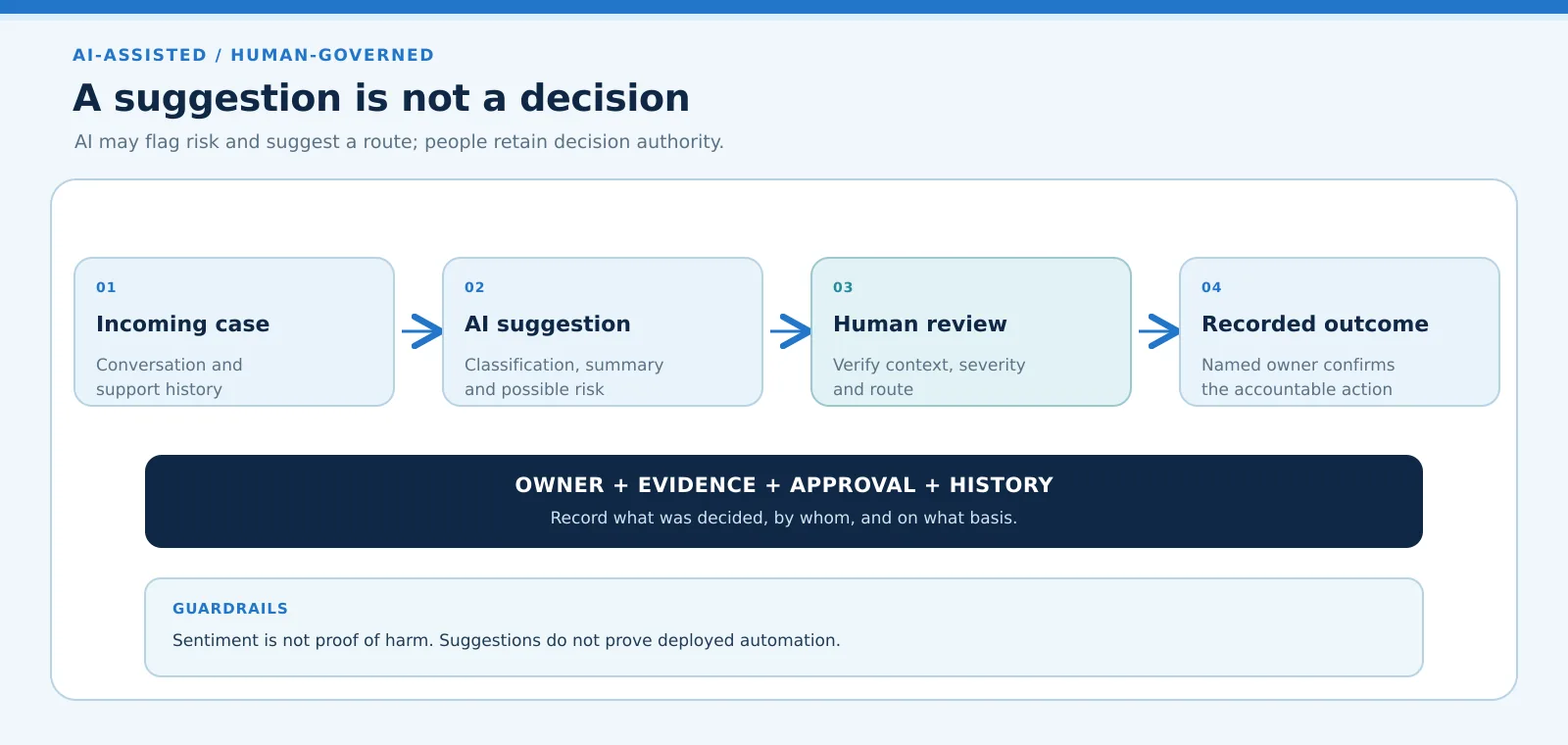
An incoming case includes conversation and support history. An AI suggestion may provide classification, summary and possible risk. A human reviewer verifies context, severity and route. The recorded outcome retains an owner, evidence, approval and history. Sentiment is not proof of harm. Suggestions are reviewed and corrected as needed; they do not prove deployed automation.
AI-ASSISTED / HUMAN-GOVERNED
A suggestion is not a decision
AI may flag risk and suggest a route; people retain decision authority.
01
Incoming case
Conversation and
support history
02
AI suggestion
Classification, summary
and possible risk
03
Human review
Verify context, severity
and route
04
Recorded outcome
Named owner confirms
the accountable action
OWNER + EVIDENCE + APPROVAL + HISTORY
Record what was decided, by whom, and on what basis.
GUARDRAILS
Sentiment is not proof of harm. Suggestions do not prove deployed automation.
AI-assisted escalation with human governance
An incoming case includes conversation and support history. An AI suggestion may provide classification, summary and possible risk. A human reviewer verifies context, severity and route. The recorded outcome retains an owner, evidence, approval and history. Sentiment is not proof of harm. Suggestions are reviewed and corrected as needed; they do not prove deployed automation.
AI-ASSISTED / HUMAN-GOVERNED
A suggestion is not a decision
AI may flag risk and suggest a route; people retain decision authority.
01
Incoming case
Conversation and
support history
02
AI suggestion
Classification, summary
and possible risk
03
Human review
Verify context, severity
and route
04
Recorded outcome
Named owner confirms
the accountable action
OWNER + EVIDENCE + APPROVAL + HISTORY
Record what was decided, by whom, and on what basis.
GUARDRAILS
Sentiment is not proof of harm. Suggestions do not prove deployed automation.
Figure 4. AI can suggest a route; the accountable human records the outcome.
Explore how AI-supported routing can complement human judgment in complex cases.
Common Escalation Path Mistakes to Avoid
The most damaging mistakes are operational rather than cosmetic. Teams document escalation levels but fail to say who accepts the case. They send partial notes that force duplicate investigation. They maintain no backup owner, reset clocks on transfer, or treat a manager notification as a completed escalation.
Another mistake is applying one escalation route to every customer. A billing approval, network outage, and suspected privacy incident have different decision-makers and evidence needs. The escalation path in customer support must make exceptions visible without turning every sensitive case into a broad, uncontrolled distribution.
Review the policy after major process changes and whenever repeated handoffs reveal an unclear boundary. An outdated matrix can be more dangerous than no matrix because it creates false confidence.
Document each override and tell the customer who is responsible for the next update.
Conclusion: Make Every Escalation Accountable
A dependable escalation path in customer support connects clear triggers to the right expertise or authority, preserves case context, and ensures the receiving owner accepts responsibility.
Build the path around work that actually occurs. Test exceptions, preserve the original timeline, and measure outcomes rather than transfer volume. The result is a more understandable support process for customers and agents alike.
It is a defined route for moving a case to the appropriate expert or decision-maker when the original owner cannot resolve it within agreed limits.
A frontline agent gathers evidence, a technical specialist investigates, and a manager approves an exceptional remedy while a case owner coordinates customer updates.
Many organizations use frontline, specialist, management, and risk or leadership levels. The actual structure varies by operating model and business risk.
Typical triggers include unresolved repeat contact, specialist dependency, authority limits, SLA risk, high impact, or a sensitive legal or privacy concern.
A matrix maps triggers to receiving roles, backups, acknowledgment targets, evidence requirements, and next steps. An escalation path is the broader operating route.
Functional escalation moves work to a person with the required expertise rather than simply to someone with a higher organizational title.
Manager escalation is appropriate when approval authority, exception handling, resources, or accountability exceed the agent's remit, subject to company policy.
The organization must assign an accountable owner explicitly. A specialist may own a task while the customer-facing case owner continues coordination and updates.
The team should follow the applicable contract or policy, notify appropriate owners, communicate with the customer, preserve timestamps, and document remedial action.
AI can recommend routing, categorize signals, and prepare summaries, but high-impact choices should retain policy-based controls and appropriate human review.
2. Financial Conduct Authority, DISP 1: Treating complainants fairly. UK financial-services rules and guidance, subject to respondent, activity and complaint eligibility. Reviewed as of November 7, 2026; the page reports its current chapter update as July 15, 2026 and a separate future version. Confirm applicable provisions and exceptions with qualified advisers. No timetable is generalized to all support cases.
4. UK ICO accountability and governance guidance. UK GDPR accountability, documentation and data protection governance. This living guidance was checked on November 7, 2026; recheck updates before applying it. It does not establish a universal customer support SLA.
About ResolveCX Product Management Team
The ResolveCX Product Management Team writes about accountable customer operations, case ownership and governed escalation workflows. Examples in this guide are illustrative, not legal advice.