Incident vs Service Request: How Support Teams Tell Them Apart
Distinguish restoration from fulfillment with 12 operational examples, four triage questions, separate workflows, classification checks and human-reviewed AI.
ResolveCX Team10 November 202616 min read5 views
Key Takeaways
1Incidents restore disrupted services; service requests deliver agreed actions.
2Urgency and the reporter's seniority do not determine classification.
3Clarify missing facts and preserve history when correcting a work type.
4Use distinct restoration and fulfillment measures with verified closure.
5AI suggests classifications; a named person validates context and decisions.
Imagine two tickets arriving together. One employee says, “Our email is down.” Another asks, “Can I have access to the analytics dashboard?” Both need support, yet sending them through the same queue can waste time and produce misleading service reports. The first calls for restoring something that should already work. The second asks for an agreed service action.
Understanding incident vs service request starts with the customer’s situation, not the subject line of a ticket. An outage demands investigation and restoration; a routine request usually needs validation, possibly approval, and fulfillment. The distinction determines ownership, priority, communication, and how success is measured.
This guide gives support leaders a practical way to classify ambiguous tickets, choose the correct workflow, document changes, and apply human oversight when AI suggests a category. The examples work for internal IT service desks and, with appropriate adaptation, other customer operations teams.
What Is the Difference Between an Incident and a Service Request?
An incident is an unplanned interruption to a service or a reduction in its quality. The immediate objective is to minimize impact and restore normal operation. A service request is a user-initiated request for an agreed service action, such as access, information, or equipment. Its objective is to deliver the requested outcome through a defined fulfillment process.
For incident vs service request decisions, ask whether something already provided is failing, or whether the user wants something provided. This distinction is ITIL-aligned, but context matters: a service request can be urgent, and an incident can affect only one person. Neither classification should be determined by urgency alone.
PeopleCert's ITIL 4 practice overviews describe the separate restoration and predefined user-request purposes. 12
Dimension
Incident
Service request
Trigger
Unplanned degradation
Agreed service action
Goal
Restore service
Deliver requested outcome
Priority
Impact and urgency
Policy and due date
Workflow
Triage → restore → verify
Validate → approve → fulfill
Closure
Recovery confirmed
Delivery confirmed
A request may require approval before execution. An incident may require immediate containment, specialist escalation, and frequent status updates. Both need accountability, relevant records, and a verified outcome. A service desk can capture both in one portal while managing them through different work types and policies.
What Counts as an Incident?
A service interruption is not always a complete outage. Slow performance, repeated errors, failed integrations, or unexpected loss of access can qualify when a service no longer performs as expected. The defining characteristic is degradation or disruption, not whether a customer uses the word “broken.”
Common incident examples
A payroll application crashes during processing; a shared network becomes inaccessible; an existing customer portal refuses valid logins; or transactions fail after an update. Each scenario requires support to determine impact, investigate evidence, restore service, and confirm recovery.
How incident priority works
Teams often combine impact and urgency to set priority. A payment outage affecting thousands of customers may demand a different response from a minor display defect affecting one user. Do not assume every incident is critical. Record affected users, service importance, start time, workarounds, and any safety or regulatory concerns. For widespread disruption, follow an established major-incident process rather than ordinary ticket handling.
Suspected cybersecurity events also need the organization's security-response procedure. NIST SP 800-61 Revision 3 addresses cybersecurity risk management and response, not a universal definition of service requests. 5
What Counts as a Service Request?
A service request typically asks an organization to perform a known, supported action. The user is not reporting that an existing service has unexpectedly failed; they want access, information, an item, or a standard service delivered.
Common service request examples
Examples include issuing a new laptop, granting an authorized employee access to a system, installing approved software, supplying a report, creating an account, or answering a standard service inquiry. Password resets are commonly handled as service requests when the normal reset process is being requested.
Catalog, approval, and fulfillment
A well-defined request includes eligibility, required information, an owner, expected completion time, and any approval step. Some requests can be fulfilled automatically; others involve security or purchasing checks. Completion should be confirmed, not assumed merely because a task was marked done. A request outside the agreed catalog may require assessment before anyone promises a fulfillment date.
Incident vs Service Request: 12 Real-World Examples
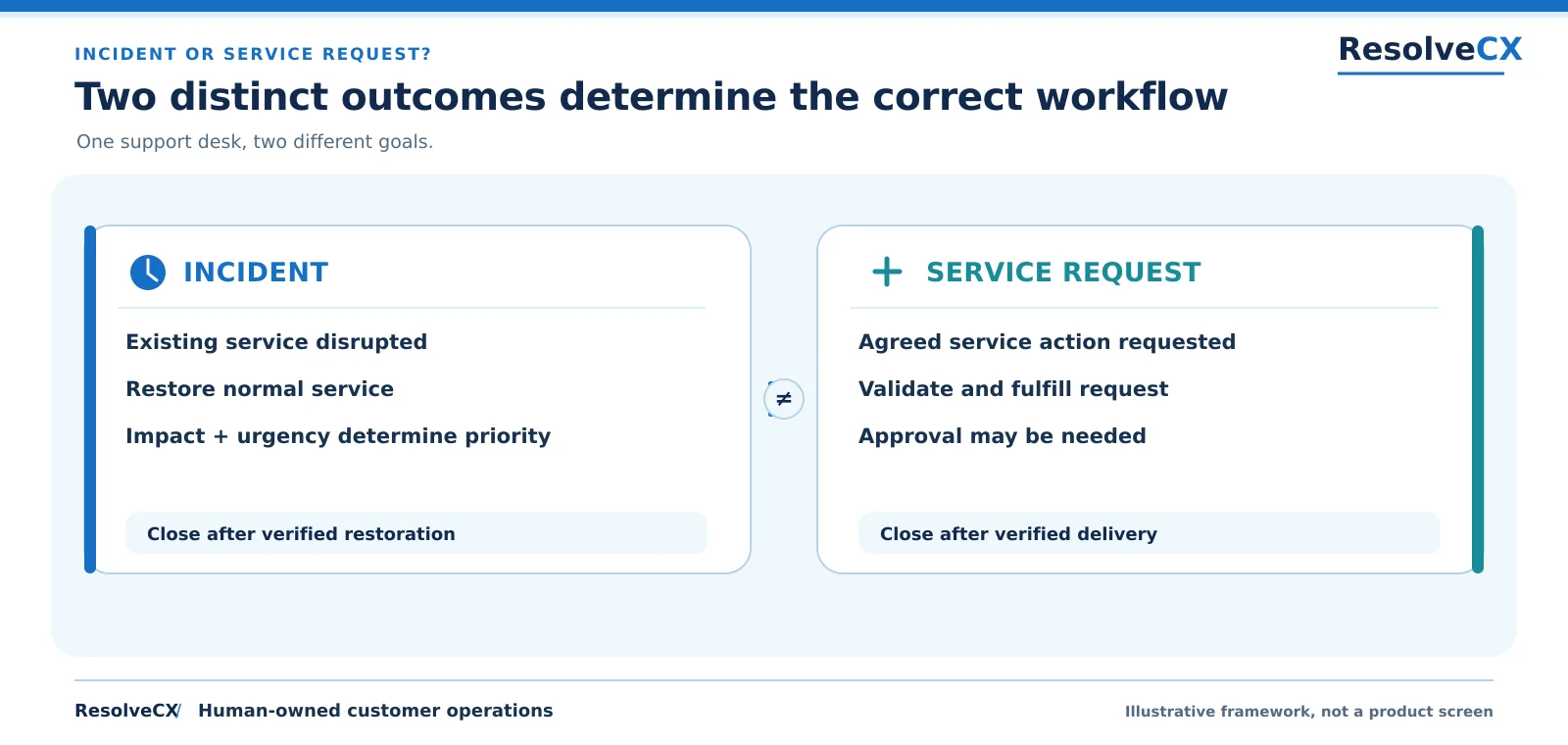
Comparison: an incident is an unplanned service degradation; restore normal service, prioritize by impact and urgency, and close after verified restoration. A service request asks for an agreed action; validate and fulfill it, obtain approval if needed, and close after verified delivery.
INCIDENT OR SERVICE REQUEST?
Two distinct outcomes determine the correct workflow
One support desk, two different goals.
Illustrative framework, not a product screen
INCIDENT
Existing service disrupted
Restore normal service
Impact + urgency determine priority
Close after verified restoration
SERVICE REQUEST
Agreed service action requested
Validate and fulfill request
Approval may be needed
Close after verified delivery
≠
Incident or service request, distinct outcomes determine workflow
Comparison: an incident is an unplanned service degradation; restore normal service, prioritize by impact and urgency, and close after verified restoration. A service request asks for an agreed action; validate and fulfill it, obtain approval if needed, and close after verified delivery.
INCIDENT OR SERVICE REQUEST?
Two distinct outcomes determine the correct workflow
One support desk, two different goals.
Illustrative framework, not a product screen
INCIDENT
Existing service disrupted
Restore normal service
Impact + urgency determine priority
Close after verified restoration
SERVICE REQUEST
Agreed service action requested
Validate and fulfill request
Approval may be needed
Close after verified delivery
≠
Figure 1. Restoration versus standard service fulfillment: verify service recovery for incidents and delivery for requests.
The most useful incident vs service request examples are ones where the same keyword can hide different situations. A login ticket, for instance, may describe a routine reset or an unexpected system failure.
User situation
Type
Why / next action
Company email unavailable for everyone
Incident
Confirm outage and restore
Employee forgot password
Request
Verify identity; reset
Valid passwords fail after release
Incident
Investigate authentication failure
New analyst needs dashboard access
Request
Validate authorization
Shared CRM suddenly runs slowly
Incident
Measure degradation
Approved software installation
Request
Fulfill standard catalog action
Payment API rejects valid transactions
Incident
Assess business impact
Team requests additional monitors
Request
Approve and supply equipment
Wi-Fi stops working on one floor
Incident
Triage affected network
New starter needs an account
Request
Provision identity
Existing account permissions disappear
Investigate
Check whether change or failure
Recurring system outage
Incident + problem
Restore then investigate cause
The examples are starting points, not universal policies. If a user requests access because permissions have unexpectedly disappeared, investigate whether the entitlement was removed intentionally or whether an existing service failed. Likewise, a slow application might reflect an incident, a known capacity limit, or an unsupported feature expectation. Ask for evidence before deciding.
How to Tell an Incident From a Service Request in Four Questions
A reliable incident vs service request triage method uses four questions in order. Avoid classification solely from ticket keywords, department, or reported emotion.
1. Is an existing service broken or degraded?
Find out what previously worked, what changed, when the issue began, and who else is affected. A failed established workflow strongly suggests an incident. Gather screenshots, error messages, affected service names, and timestamps where appropriate. Do not ask users to share passwords or other secrets.
2. Is the user asking for an agreed, standard action?
Check whether the service catalog or support policy already defines the action. New access, equipment, standard information, and supported provisioning commonly fit the service-request path. Confirm the requester’s identity and authorization through approved methods.
3. Is the goal restoration or fulfillment?
Restoration gets an impaired service working again. Fulfillment delivers an agreed item or action. This question resolves many borderline cases because the appropriate success condition becomes clear. Incident resolution needs evidence of recovery; request completion needs evidence of delivery and any required authorization.
4. Is the evidence incomplete or does the ticket contain both?
Do not guess. Ask a precise follow-up question, or create linked records when an outage and a new access request genuinely require different processes. Preserve the original submission, classification decision, and subsequent changes. If the record was classified incorrectly, correct it through an auditable reclassification step.
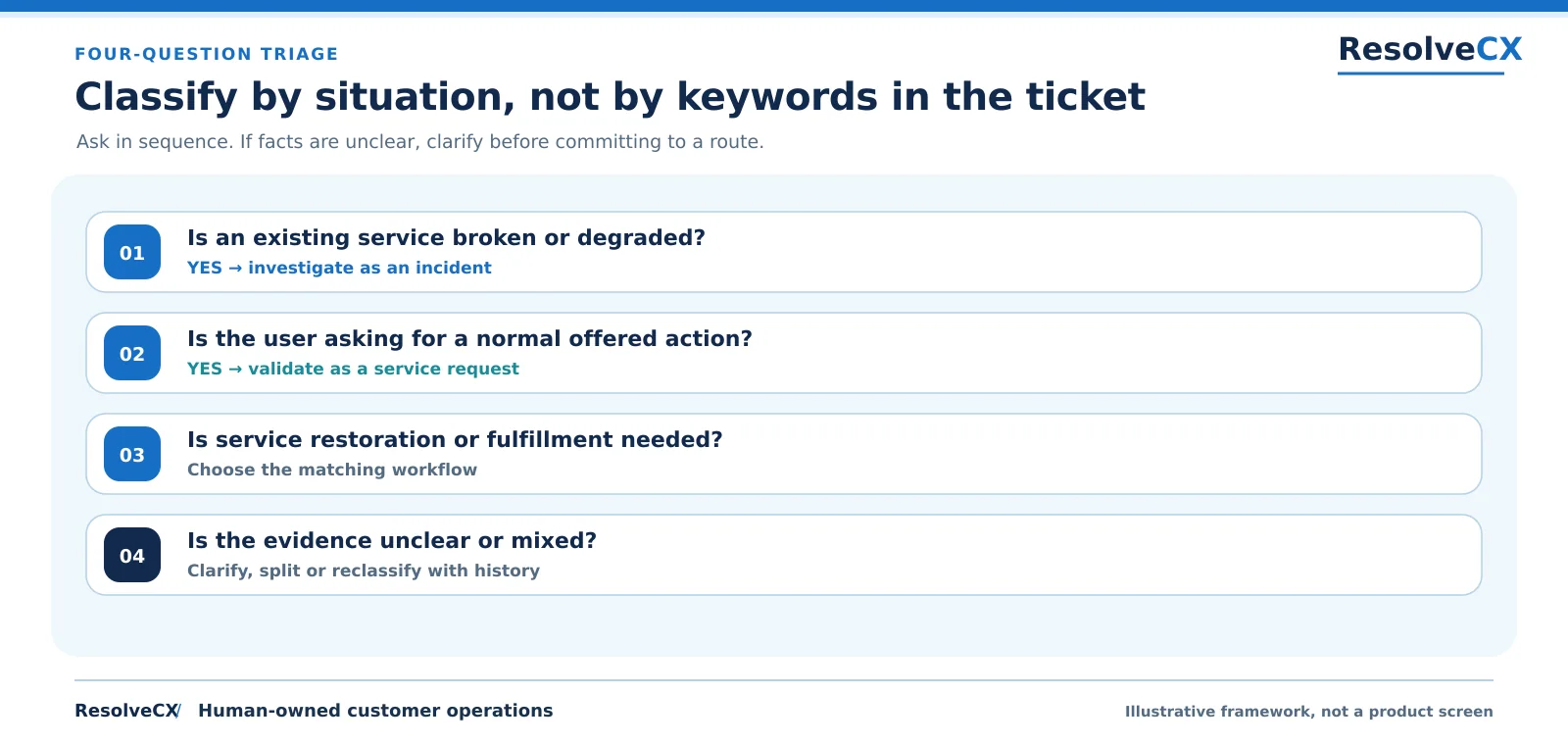
Ordered triage: Is an existing service broken or degraded? Yes means investigate as an incident. Is the user asking for a normal offered action? Yes means validate as a service request. Is service restoration or fulfillment needed? Choose the matching workflow. Is evidence unclear or mixed? Clarify, split or reclassify with history.
FOUR-QUESTION TRIAGE
Classify by situation, not by keywords in the ticket
Ask in sequence. If facts are unclear, clarify before committing to a route.
Illustrative framework, not a product screen
01
Is an existing service broken or degraded?
YES → investigate as an incident
02
Is the user asking for a normal offered action?
YES → validate as a service request
03
Is service restoration or fulfillment needed?
Choose the matching workflow
04
Is the evidence unclear or mixed?
Clarify, split or reclassify with history
Four questions to decide the correct work type
Ordered triage: Is an existing service broken or degraded? Yes means investigate as an incident. Is the user asking for a normal offered action? Yes means validate as a service request. Is service restoration or fulfillment needed? Choose the matching workflow. Is evidence unclear or mixed? Clarify, split or reclassify with history.
FOUR-QUESTION TRIAGE
Classify by situation, not by keywords in the ticket
Ask in sequence. If facts are unclear, clarify before committing to a route.
Illustrative framework, not a product screen
01
Is an existing service broken or degraded?
YES → investigate as an incident
02
Is the user asking for a normal offered action?
YES → validate as a service request
03
Is service restoration or fulfillment needed?
Choose the matching workflow
04
Is the evidence unclear or mixed?
Clarify, split or reclassify with history
Figure 2. Four-question triage checks existing failure, an agreed action, restoration or fulfillment, and unclear or mixed evidence.
For incident vs service request classification, uncertainty is a reason to improve evidence, not an excuse to leave a case unowned. Assign someone to obtain missing facts and establish the next review point.
How Incident and Service Request Workflows Differ
Incident management focuses on restoring an agreed service as quickly and safely as the situation requires. Request fulfillment focuses on delivering a known service action accurately and predictably. Both involve communication, but their clocks and closure criteria should reflect different objectives.
Capture the disruption, assess its impact, assign an incident owner, investigate or contain the failure, communicate progress, and verify restoration. Escalate when expertise, authority, or response urgency demands it. For significant events, retain a timeline and link follow-up problem investigation when appropriate.
Service request workflow: validate, approve, fulfill, confirm
Verify what was requested, check eligibility, obtain any necessary authorization, complete fulfillment, and confirm the user received the intended service. Requests should not be closed solely because an approval was granted if the actual service has not been delivered.
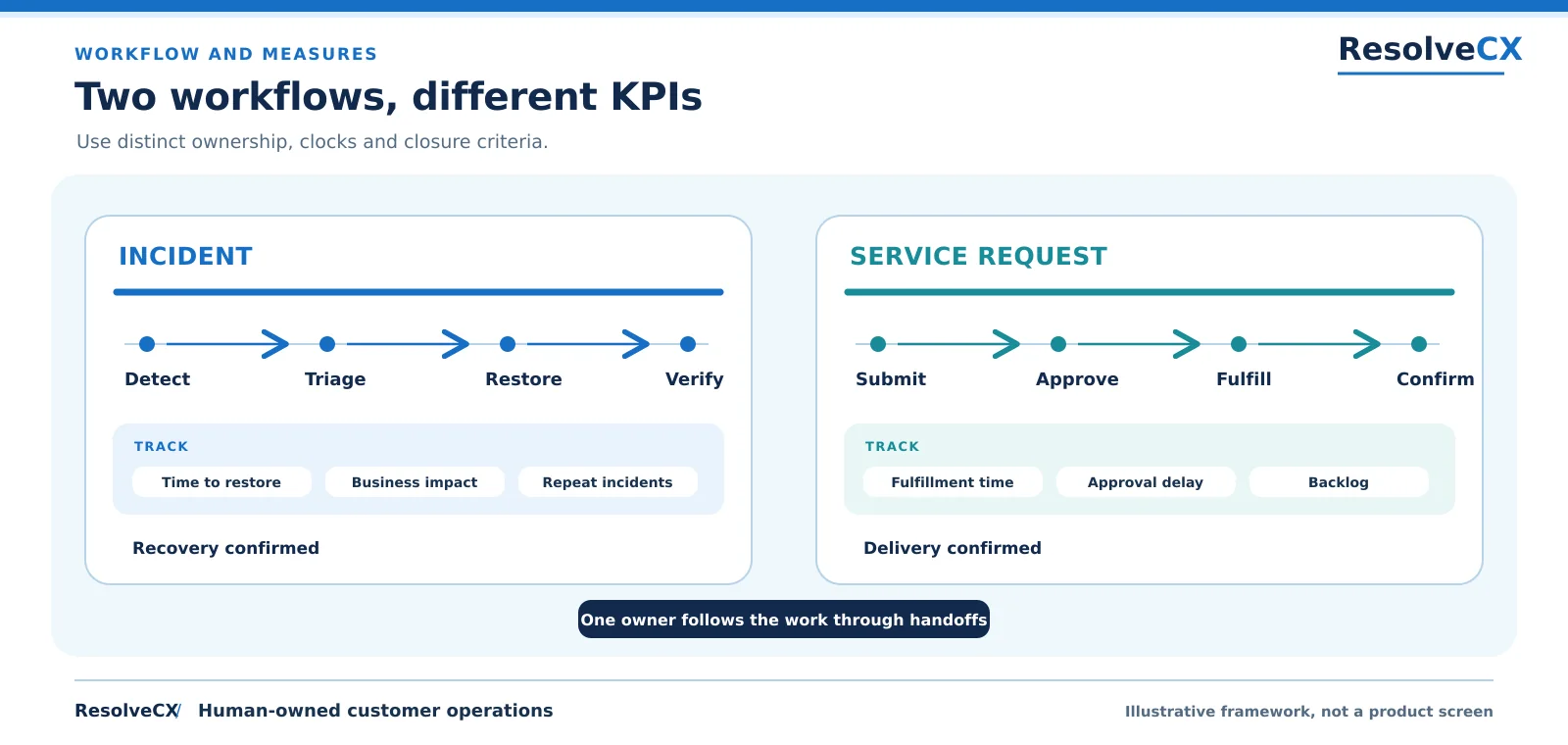
Incident workflow: Detect, Triage, Restore, Verify; measures include time to restore, business impact and repeat incidents; closure means recovery confirmed. Service request workflow: Submit, Approve, Fulfill, Confirm; measures include fulfillment time, approval delay and backlog; closure means delivery confirmed. One owner follows the work through handoffs.
WORKFLOW AND MEASURES
Two workflows, different KPIs
Use distinct ownership, clocks and closure criteria.
Illustrative framework, not a product screen
INCIDENT
Detect
Triage
Restore
Verify
TRACK
Time to restore
Business impact
Repeat incidents
Recovery confirmed
SERVICE REQUEST
Submit
Approve
Fulfill
Confirm
Fulfillment time
Approval delay
Backlog
Delivery confirmed
One owner follows the work through handoffs
Workflow stages and measures for each ticket type
Incident workflow: Detect, Triage, Restore, Verify; measures include time to restore, business impact and repeat incidents; closure means recovery confirmed. Service request workflow: Submit, Approve, Fulfill, Confirm; measures include fulfillment time, approval delay and backlog; closure means delivery confirmed. One owner follows the work through handoffs.
WORKFLOW AND MEASURES
Two workflows, different KPIs
Use distinct ownership, clocks and closure criteria.
Illustrative framework, not a product screen
INCIDENT
Detect
Triage
Restore
Verify
TRACK
Time to restore
Business impact
Repeat incidents
Recovery confirmed
SERVICE REQUEST
Submit
Approve
Fulfill
Confirm
Fulfillment time
Approval delay
Backlog
Delivery confirmed
One owner follows the work through handoffs
Figure 3. Incident and service request workflows have distinct owners, clocks, closure evidence and performance measures.
A sound incident vs service request process also makes handoffs visible. The record should show who owns the next action, what is waiting, and when the user can expect another update. Ownership should not disappear when work passes between teams.
How Should Teams Prioritize and Measure Each Ticket Type?
Using identical dashboards for both ticket types can hide operational problems. Incident teams need to understand disruption, restoration speed, repeated failures, and impact. Request teams need to understand fulfillment time, approval delays, workload, and whether the delivered service met expectations.
Measure
Incident
Service request
Time target
Time to restore service
Time to fulfill request
Priority logic
Impact and urgency
Promise, eligibility, need
Useful indicators
Impact, repeat incidents
Approval delays, backlog
Closure evidence
Service recovered
Action delivered
An incident's priority may change as evidence of business impact emerges. A request may be time-sensitive without indicating a broken service; an access request for a new starter tomorrow can be urgent but remains a request. Establish separate service targets and escalation rules wherever practical, while reporting shared indicators such as user communication quality and unresolved backlog.
What Happens When a Service Request Is Actually an Incident?
A wrong classification should be corrected quickly without erasing the original record. Consider a “password reset” ticket: the agent initially follows normal fulfillment, then discovers that valid users cannot authenticate after a system deployment. The situation now indicates an unexpected service failure, so it needs incident investigation.
A disciplined incident vs service request reclassification procedure should preserve the submitted description and timestamp, document what new evidence changed the decision, identify the new owner, and apply the correct workflow and target. Notify the user when expectations or priority change. If an approval was already recorded, retain it rather than silently deleting history.
For mixed cases, link separate records. A system outage may require restoration while an unrelated access request still needs fulfillment. Avoid treating every related request as part of one incident simply because the same service name appears.
Incident vs Service Request vs Problem vs Change
An incident restores a disrupted service. A service request delivers an agreed service action. A problem is a cause, or potential cause, of one or more incidents. Problem management investigates causes and aims to reduce the likelihood and impact of incidents. A change adds, modifies, or removes something that could affect a service, typically through an appropriate change-control approach.
These concepts intersect but are not interchangeable. A repeated outage may generate multiple incident records and one problem investigation. A standard access request might be fulfilled through an approved change procedure. Separating records helps teams preserve the right accountability, timing, and reporting.
Incident vs service request classification informs the immediate work, while urgent containment and related problem or change activities may proceed in parallel. Those related processes do not remove the need to understand the user's immediate need.
How AI Can Help Support Teams Classify and Route Tickets
AI can help summarize descriptions, identify likely intent, surface related incidents, and recommend routing. A model might suggest that “everyone gets an error after login” is an incident, while “please provision access for our new analyst” fits a service request. These suggestions can accelerate initial review when paired with trustworthy context.
However, model output is not proof. The text alone may omit entitlement history, business impact, approvals, or service status. A support agent should review uncertain classifications, especially when a mistake could delay urgent restoration or expose sensitive data.
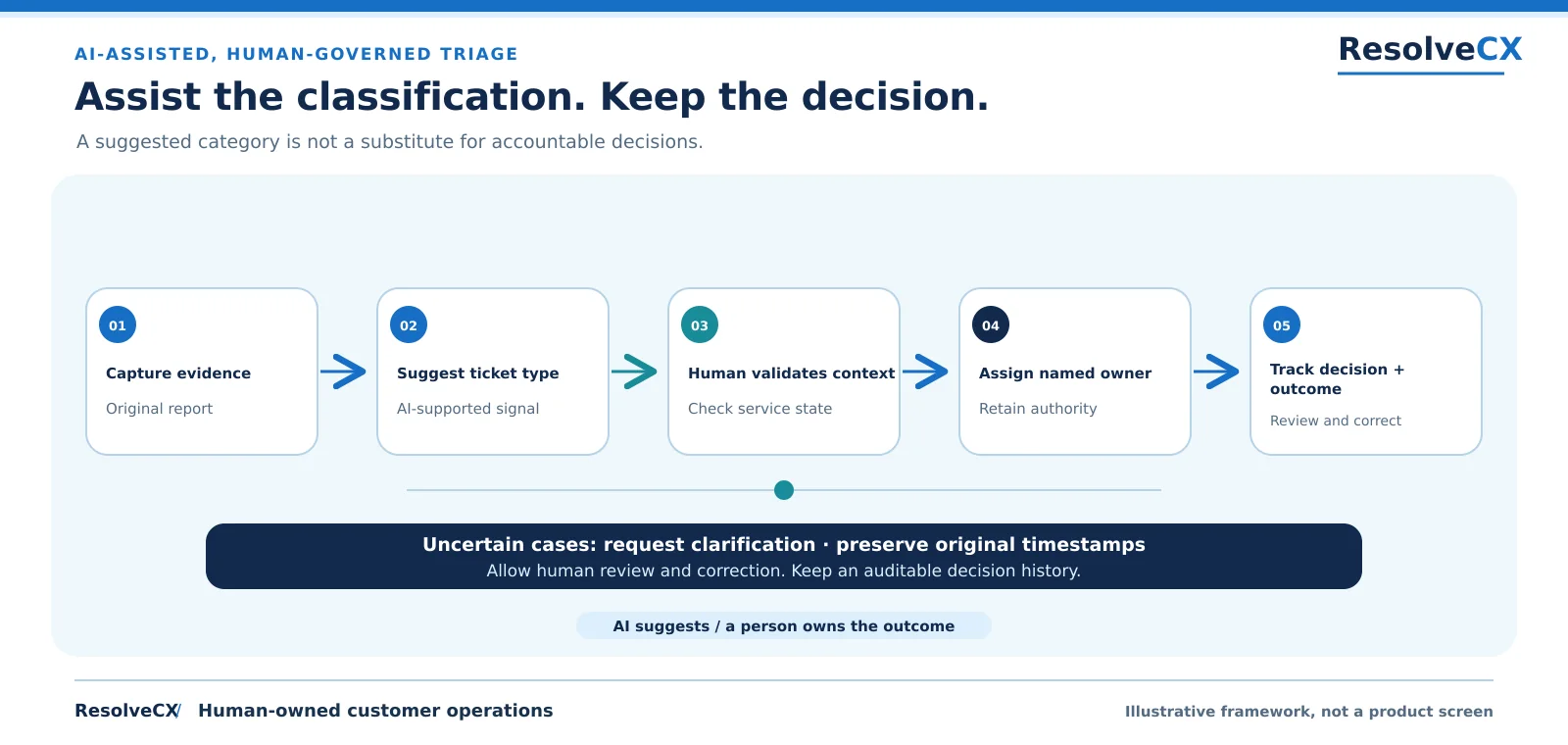
Five steps: capture evidence, suggest ticket type, have a human validate context, assign a named owner, and track decision and outcome. For uncertain cases, request clarification, preserve original timestamps, allow review and correction, and keep an auditable decision history.
AI-ASSISTED, HUMAN-GOVERNED TRIAGE
Assist the classification. Keep the decision.
A suggested category is not a substitute for accountable decisions.
Illustrative framework, not a product screen
01
Capture evidence
Original report
02
Suggest ticket type
AI-supported signal
03
Human validates context
Check service state
04
Assign named owner
Retain authority
05
Track decision +
outcome
Review and correct
Uncertain cases: request clarification · preserve original timestamps
Allow human review and correction. Keep an auditable decision history.
AI suggests / a person owns the outcome
AI-assisted, human-governed triage
Five steps: capture evidence, suggest ticket type, have a human validate context, assign a named owner, and track decision and outcome. For uncertain cases, request clarification, preserve original timestamps, allow review and correction, and keep an auditable decision history.
AI-ASSISTED, HUMAN-GOVERNED TRIAGE
Assist the classification. Keep the decision.
A suggested category is not a substitute for accountable decisions.
Illustrative framework, not a product screen
01
Capture evidence
Original report
02
Suggest ticket type
AI-supported signal
03
Human validates context
Check service state
04
Assign named owner
Retain authority
05
Track decision +
outcome
Review and correct
Uncertain cases: request clarification · preserve original timestamps
Allow human review and correction. Keep an auditable decision history.
AI suggests / a person owns the outcome
Figure 4. Capture evidence, suggest a type, validate context with a human, assign a named owner and track the decision and outcome.
For incident vs service request triage assisted by AI, keep a named human owner, supporting evidence, reviewable decisions, and a clear way to override or correct predictions. ResolveCX supports governed incident and case operations; an AI classification feature does not by itself provide a full ITIL service catalog or request-fulfillment engine.
Incident and Service Request Classification Checklist
Before routing any ticket, confirm the affected service, original user request, whether something previously worked, the business impact, and the action required. Record the chosen type and its rationale. Identify the accountable owner, priority or fulfillment target, evidence, approvals, and next communication. If the situation is uncertain, document the clarification needed and assign a review time. If classification changes later, preserve its history.
This simple incident vs service request checklist helps support leaders audit consistency without forcing agents into rigid decisions that ignore context.
One practical safeguard is to distinguish the reporter from the affected service. A single person may report a failure impacting an entire department, while a busy manager may file an entirely routine request. Count actual service impact rather than judging urgency from the sender's seniority.
Keep the classification policy available to support agents in the same place they work. A short decision tree, clear exceptions, and two or three reviewed examples are easier to apply during a busy shift than an extensive policy document. Review misrouted tickets periodically and update guidance when patterns emerge.
When auditing service performance, look beyond aggregate ticket closure rates. A team could close simple requests rapidly while major service disruptions remain unresolved. Separate trend lines reveal whether restoration capability, approval processes, or capacity planning needs attention.
For example, a customer asking to activate a new subscription is normally requesting a service action. A customer whose active subscription suddenly stops working is reporting degradation. The same account details may appear in both tickets, but the required investigation and closure evidence differ.
For a weekly quality review, sample recent tickets that were reassigned, closed without user confirmation, or reported again after resolution. Ask whether the original user need was correctly classified and the outcome was verified.
Conclusion: Classify the Work Before Choosing the Workflow
The practical answer to incident vs service request is restoration versus fulfillment. Determine whether an existing service failed or the user wants an agreed service action, then apply the matching owner, evidence, priority, communication, and closure rules. When facts are ambiguous, clarify and document the reasoning rather than guessing.
Better classification supports faster response, clearer accountability, and more meaningful service reporting.
An incident concerns unplanned service interruption or degraded service quality. A service request asks for an agreed service action, such as new access, equipment, or information. Incident management aims to restore service; request management aims to fulfill the action.
A routine forgotten-password reset is commonly a service request. An unexpected authentication failure affecting an existing service may be an incident. Ask whether the normal reset process is being requested or whether functioning access has unexpectedly stopped.
Installing approved software is usually a standard service request, subject to eligibility and authorization. If an already-installed critical application stops functioning, investigate it as an incident instead.
Yes. New evidence can show that a ticket originally presented as a request actually describes an outage. Reclassify it with a documented reason, preserve its timeline, and notify the correct owner and user.
Yes. ITIL treats incident management and service request management as distinct practices with different goals. An organization may use one service portal while maintaining separate work categories and processes.
An incident focuses on restoring a disrupted service. Problem management examines causes and works to reduce the likelihood or impact of recurring incidents. An unresolved problem does not prevent restoration work from proceeding.
No. A request can have a tight deadline or important business consequences. Urgency alone does not convert a standard request into an incident; assess service status and the action needed.
AI can suggest ticket categories and highlight supporting context, but teams should evaluate prediction quality and maintain human review for uncertain or consequential cases. Classification decisions should remain explainable and correctable.
Approval depends on organizational policy and request type. A manager, system owner, security representative, or budget authority may need to approve access or purchases before fulfillment.
Often yes, because restoration and fulfillment are different objectives. Establish meaningful measures and time commitments for each workstream while preserving a consistent approach to customer communication and accountability.
Sources and References
The ISO references provide service-management system and vocabulary context. Their public abstracts are not evidence that these illustrative workflows are mandatory, or that ResolveCX is certified. 34
ResolveCX Team are practitioners and product specialists in complaint governance, escalation management, and regulated CX operations. Our articles draw on real implementation experience across financial services, healthcare, and telecommunications.