
Simple request
A ticket can be enough
One team completes a clear request through a short queue process, with limited evidence and no material approval or investigation.
Case management
ResolveCX is customer service case management software for complex, cross-team issues. Bring interactions, evidence, tasks and decisions into one governed record, with accountable ownership and human-controlled outcomes.
Bring interactions and supporting material into one case.
Keep owners, tasks and contributors aligned.
Record rationale, approvals and customer communication.
Apply closure criteria and review recurring issues.
Simple request
One team completes a clear request through a short queue process, with limited evidence and no material approval or investigation.
Complex work
Several teams can contribute while one owner coordinates evidence, decisions, deadlines, tasks and the reviewable outcome.
One controlled flow
Seven stages give teams a shared operating picture without turning the product into another queue of disconnected tasks.
Bring interactions, documents and referrals into a structured record.
Confirm issue, urgency and relevant customer context.
Set an accountable owner, queue, deadline and review date.
Manage tasks, contributors, permissions and required evidence.
Record rationale, approvals, remedy and customer communication.
Apply closure criteria, reopen rules and handoff paths.
Link recurring issues to root-cause work and corrective action.
Governed AI
ResolveCX can assist with classification, summaries, risk signals and routing. People review the output, can override it and remain responsible for communication, decisions and outcomes.
Review ResolveCX AI capabilitiesSuggest a category, urgency and confidence signal. A trained advisor reviews, corrects or rejects the proposal.
Draft a case summary from authorized interactions and evidence. The owner checks it against the source before use.
Flag configured sentiment, urgency or vulnerability signals for inspection. A signal never decides eligibility or remedy.
Suggest an eligible queue or related record. A queue lead can override the recommendation and record why.
Built for complex operations
Start with the process, evidence and ownership your operation already needs. Configure the workflow around your approved controls.
Configure complaint ownership, vulnerability review, deadlines, approvals and root-cause work around your approved policies. Regional obligations need separate validation.
Explore the workflowRelate patients, representatives, permissions, grievances, evidence and learning within controlled workflows. Local health requirements remain subject to the provider's assessment.
Explore the workflowConnect account, product, fault, engineering task, deadline and resolution evidence. Country-specific requirements must be configured and reviewed.
Explore the workflowSeparate clients or business units through agreed permissions, routing, service levels, quality review and reporting.
Explore the workflowBefore you go live
Work through security, data flow and delivery early, so your team knows what needs to be confirmed, configured and tested.
01 / Controls
Review roles, business-unit boundaries, encryption, audit history, retention, deletion, recovery, single sign-on, hosting and residency against the current solution and your requirements.
Questions for discovery
02 / Data flow
Email, forms, referrals, APIs, webhooks, documents and manual creation can be evaluated alongside CRM, identity, knowledge, storage and reporting relationships. Named connectors are confirmed during discovery.
Questions for discovery
03 / Delivery
Discovery, process mapping, configuration, integration, migration, testing, training and launch are shaped by workflow scope, data quality, permissions and dependencies.
Questions for discovery
Buyer questions
It manages a complex issue as one governed record. ResolveCX connects interactions, evidence, tasks, owners, deadlines, decisions and outcomes across teams, so work remains accountable until the underlying issue and required actions are complete.
A ticket usually records a request and tracks its status. A customer case can coordinate several people, tasks, evidence items, deadlines and decisions. A ticket can be sufficient for a simple request, while a governed case is better suited to complex, sensitive or cross-team work.
ResolveCX is intended for customer operations, contact center, complaints, compliance, quality, risk and service-recovery teams handling complex work. It is most relevant when ownership crosses teams, evidence must remain attributable or closing a ticket does not resolve the underlying issue.
ResolveCX can use authorized case data to propose classifications, summaries, risk signals and routing. Configured users review the output, see confidence or rule context where applicable, correct or override it and retain an audit event. People remain responsible for communications, decisions and outcomes.
ResolveCX can apply configured due dates, pause rules, alerts, exceptions and escalation paths to a case. These controls support an organization's operating process, but the organization must validate its own legal and regulatory obligations.
Intake can be designed around email, forms, contact center referrals, APIs, webhooks, documents and manual creation. CRM, identity, knowledge, storage and reporting relationships depend on the agreed architecture. Named connector support is confirmed during discovery rather than assumed.
Security should be assessed against the current solution design and documentation. The review covers access roles, business-unit boundaries, encryption, audit history, retention, deletion, backup, recovery, single sign-on, hosting and residency. No certificate or location is implied by this page.
Implementation time depends on workflow scope, data quality, permissions, migration and integration complexity. A scoped plan normally covers discovery, process mapping, configuration, integration, testing, training, launch and optimization. ResolveCX confirms timing after those dependencies are understood.
A migration assessment can map source fields, owners, evidence, relationships and retention rules before import. The project team agrees data quality checks, trial loads, reconciliation, acceptance and rollback criteria before cutover.
Configured reports can track backlog, ageing, service-level attainment, first-contact resolution, reopen rate, escalation, resolution time and repeat issues. Teams define each measure and can link patterns to root-cause records, corrective actions and accountable owners.
Pricing is scoped through the contact route because users, case volume, workflows, AI functions, deployment, integrations, migration and services can change the requirement. This page does not publish an unverified price or offer.
Measure ROI against an agreed baseline and period. Relevant inputs can include handling effort, rework, backlog, resolution time, service-level attainment, reopen rate and escalation cost. Record the population, calculation and other operational changes so the result is not attributed to software alone.
Next step
Talk through ownership, evidence, integrations and the controls your operation needs before you commit to a platform.
Book a case management demoKeep exploring
Relevant guides and real-world perspectives for the work you are doing now.
 Guide
GuideHow complaints and incidents move through defined escalation tiers, with SLA enforcement, named ownership, and governed handoffs. Why unstructured escalation creates regulatory and commercial risk.
Explore resource Guide
GuideAPI-based case creation from Webex Connect IVR events, agent screen pop via the Webex CC Desktop Widget SDK, case management layer behind the Webex CC agent desktop, and bi-directional status sync to Webex Analyzer dashboards where configured.
Explore resource Guide
GuideAXP open API case creation from Avaya IVR events, Avaya Aura CTI screen pop, structured case management behind the ACE agent desktop following DevConnect API patterns, and supervisor dashboard status sync.
Explore resource Guide
GuideSuperAPI case creation from Five9 IVR script webhooks, Agent Desktop Toolkit screen pop, case management behind Five9 VCC, and bi-directional status sync to Five9 Supervisor Application.
Explore resource Blog
BlogPractical thinking on complaint governance, escalation management, and case resolution for regulated industries.
Explore article Video
VideoSee complaint governance, case management, and escalation workflows explained by the ResolveCX team.
Explore video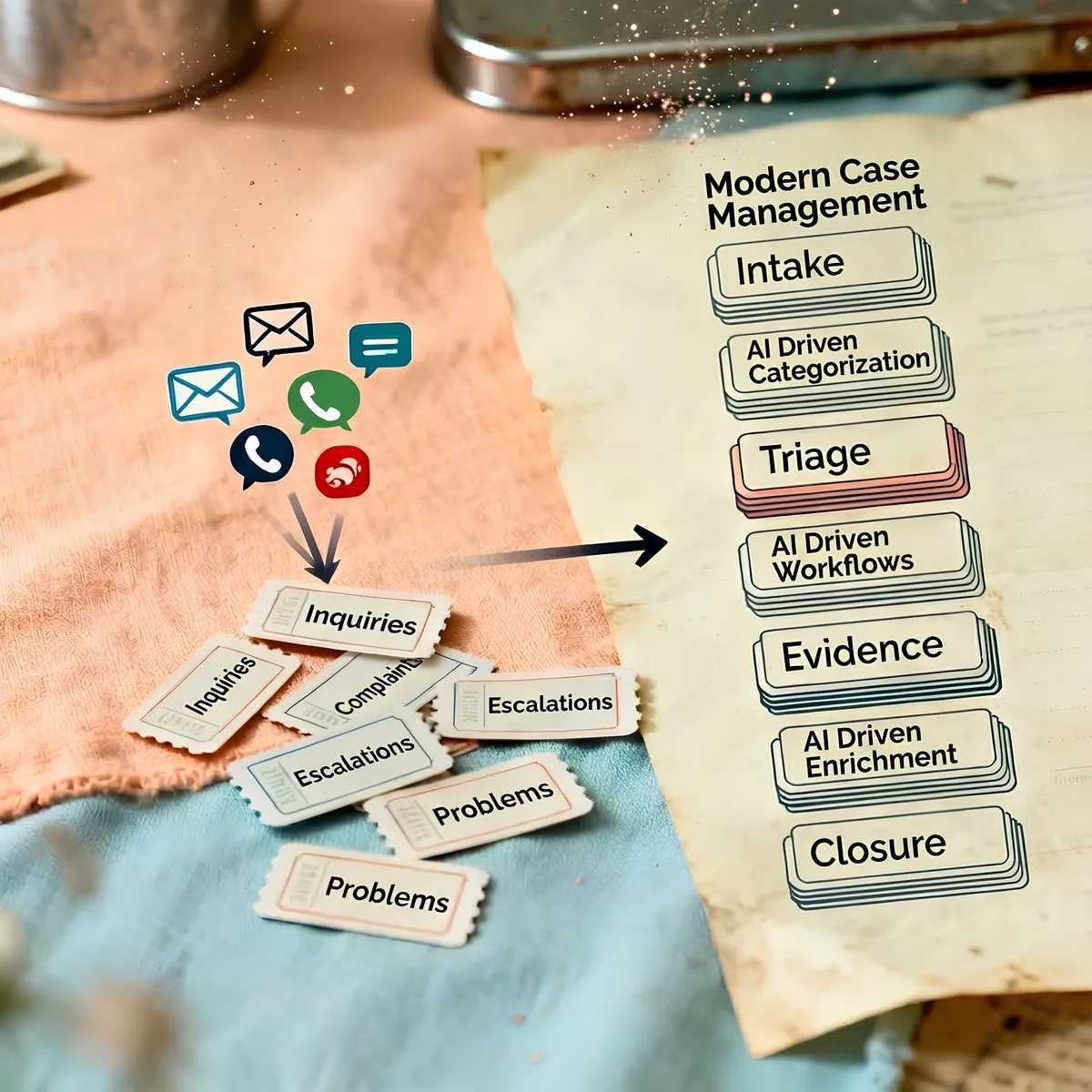 Case study
See how regulated healthcare teams improved SLA adherence, reduced escalations, and accelerated audit preparation.
Explore resourceFollow the latest ResolveCX updates, governance conversations, and practical customer operations insights.
Explore resource