HUMAN SUPPORT
Make supported order changes in context.
Agents can carry out supported order updates, cancellations and refunds from ResolveCX, subject to the integration setup and permissions.


Commerce support, connected
Order context. Supported action. One support workspace.
Bring customer profiles and live order details into ResolveCX, so your team can understand the request and take supported action without switching platforms.
Book a Shopify demoShopify data and supported actions, in the context of the customer.
A clearer way to handle the order question.
See customer and order history together.
Understand fulfilment and tracking status in context.
Take supported action from the support workspace.
A closer look at the workspace
See purchase history first, then open an order for its line items and fulfilment details in these actual ResolveCX product screens.
Product screenshots with identifying details hidden.
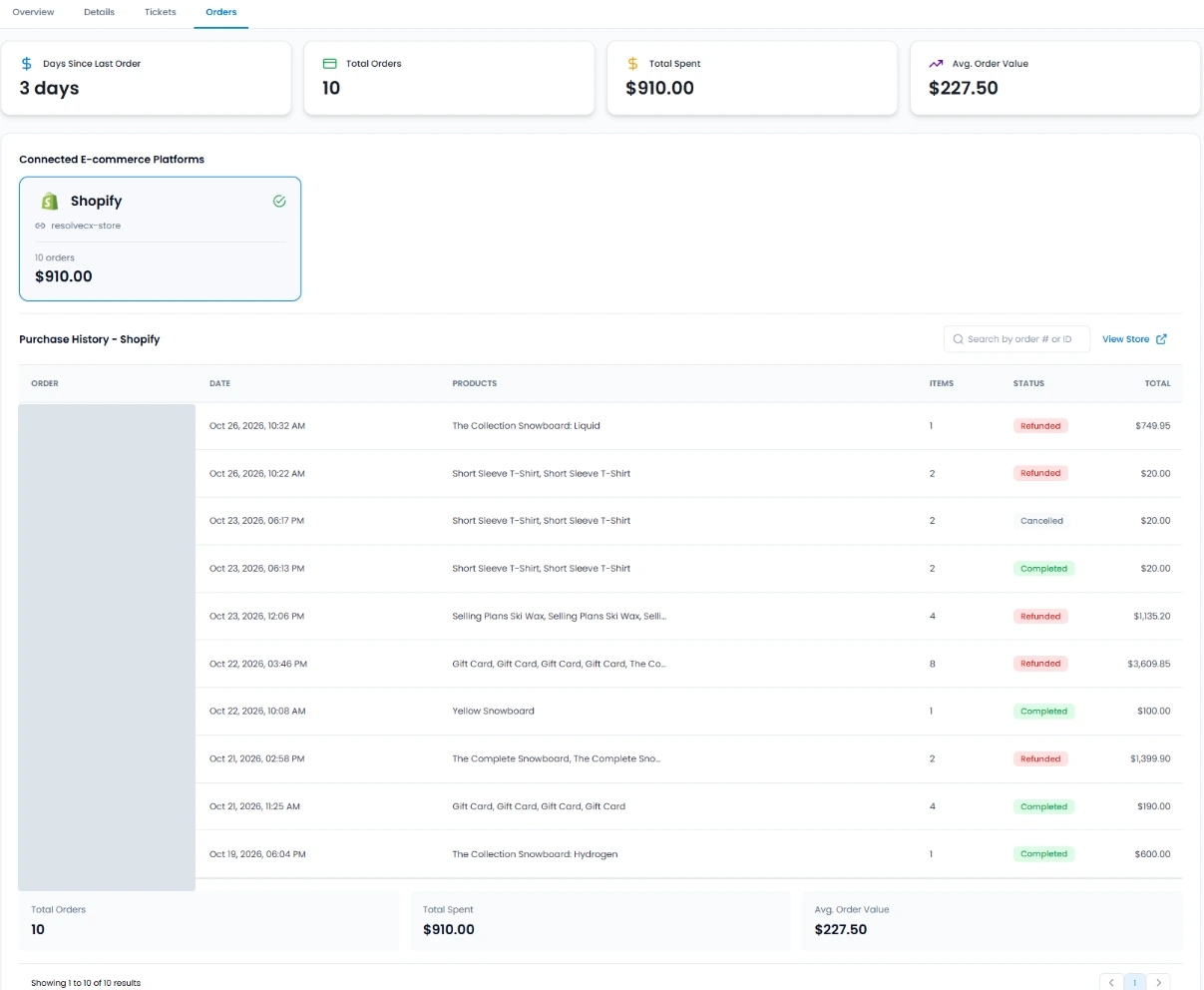
A customer’s Shopify purchase history brings dates, products, item counts, order statuses and totals into one view.
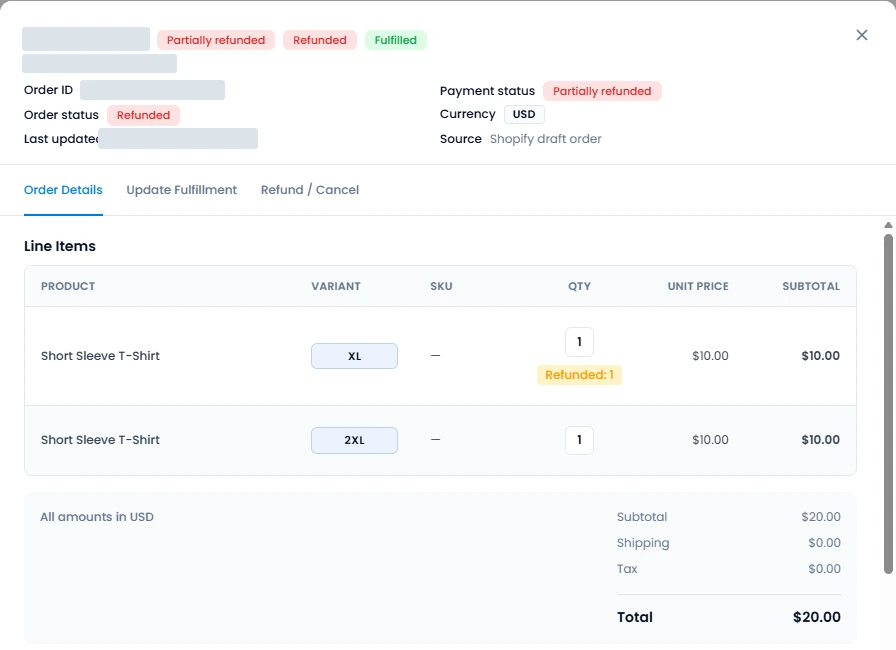
The order record shows its status alongside products, variants, quantities and amounts.
Open full-size order details screenshot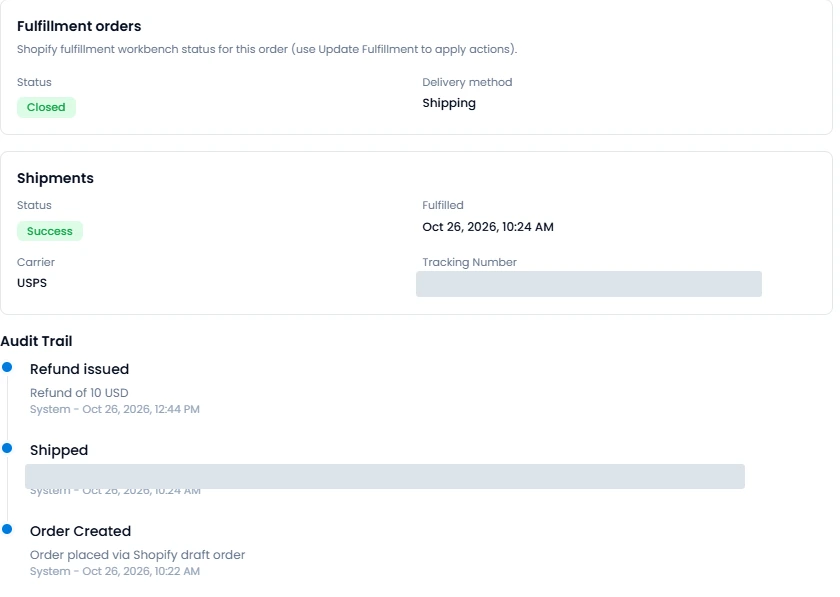
Review fulfilment and shipment status, delivery method, carrier, tracking details and the order’s activity history.
Open full-size fulfilment and tracking screenshotThe right action, with the right boundaries
HUMAN SUPPORT
Agents can carry out supported order updates, cancellations and refunds from ResolveCX, subject to the integration setup and permissions.
AI ASSISTANCE
AI can answer order questions and take supported actions when permitted by your business rules and configured permissions.
Action availability depends on your business rules, integration configuration and permissions.
A familiar support moment
Customer and order context helps teams respond to common post-purchase questions with the relevant detail close at hand.
Review order status, fulfilment progress and tracking before answering a delivery question.
Where supported and permitted, a human agent can make the order change from the support workspace.
Use the order context to address the request. Supported refund actions depend on configured permissions.
For retail and ecommerce teams
Common questions
ResolveCX synchronises customer profiles, order history, order status, fulfilment progress and tracking information in real time, giving support teams useful order context in their workspace.
Supported order updates, cancellations and refunds can be performed in ResolveCX by human support staff. Available actions depend on the configured integration and permissions.
AI can answer order questions and carry out supported actions when allowed by your business rules and configured permissions. This does not mean every request or action is available for every setup.
No. Shopify remains the commerce platform. ResolveCX brings relevant customer and order context into the support workspace, where teams can take supported actions without switching platforms.
Start with your workflow
Talk with ResolveCX about the Shopify information your team needs and the actions your setup supports.
Keep exploring
Relevant guides and real-world perspectives for the work you are doing now.
 Integration overview
An overview of the ResolveCX and NICE CXone integration destination.
Explore resource Integration overview
An overview of the ResolveCX and Cisco Webex Contact Center integration destination.
Explore resource Integration overview
An overview of the ResolveCX and Avaya Experience Platform integration destination.
Explore resource Integration overview
An overview of the ResolveCX and Five9 Contact Center integration destination.
Explore resource Blog
BlogPractical thinking on complaint governance, escalation management, and case resolution for regulated industries.
Explore article Video
VideoCase classification, sentiment-driven routing, summaries and response suggestions with AI controls.
Explore video Case study
See how regulated healthcare teams improved SLA adherence, reduced escalations, and accelerated audit preparation.
Explore resourceFollow the latest ResolveCX updates, governance conversations, and practical customer operations insights.
Explore resource